
Unlock this and dozens of other powerful features by upgrading to EngageBox Pro.
Unlock this feature
 Tassos Docs
EngageBox
v7.1.0
-
- AcyMailing
- Browser
- City
- Component Condition
- Continent Condition
- Convert Forms Conditions
- Cookie Condition
- Country Condition
- Date Condition
- Day of Week
- Device Condition
- Display Conditions
- E-Commerce Conditions (VirtueMart - HikaShop)
- EngageBox - Viewed Another Popup Condition
- Homepage
- IP Address Condition
- Joomla! Content Article Condition
- Joomla! Content Category Condition
- Joomla! Content Component View Condition
- K2 Category
- K2 Item
- K2 Page Type
- K2 Tag
- Language
- Menu Item
- Month
- New/Returning Visitor Condition
- Operating System
- Pageviews Condition
- PHP
- Referrer URL Condition
- Region
- Time on Site
- Time Range
- Trigger based on URL match
- URL Condition
- User Access Level Condition
- User Condition
- User Group
-
- Show a Floating Button After Popup is Closed
- Create Multilingual Popups
- Randomly Rotate Popups on a Page
- Αdd Sound Effects to Popup
- Make Accessible Popups
- Add Countdown Timer to Popup
- Limit impressions per unique visitor
- Test the responsiveness of your boxes for various devices and viewports
- Open a box by clicking on a menu item
- Trigger based on the minimum time visitor spent on the site
- Auto-Close Popup After a Specific Time
- Control Popup using HTML Attributes
Salesforce Integration
Salesforce Integration is available in Pro
A SalesForce lead form has great potential within your website. Here's the step-by-step guide.
Before everything you have to follow all the steps as they are described in SalesForce's Help Document all the way to step 9 where you will end up with the needed generated HTML.
How to use the generated HTML
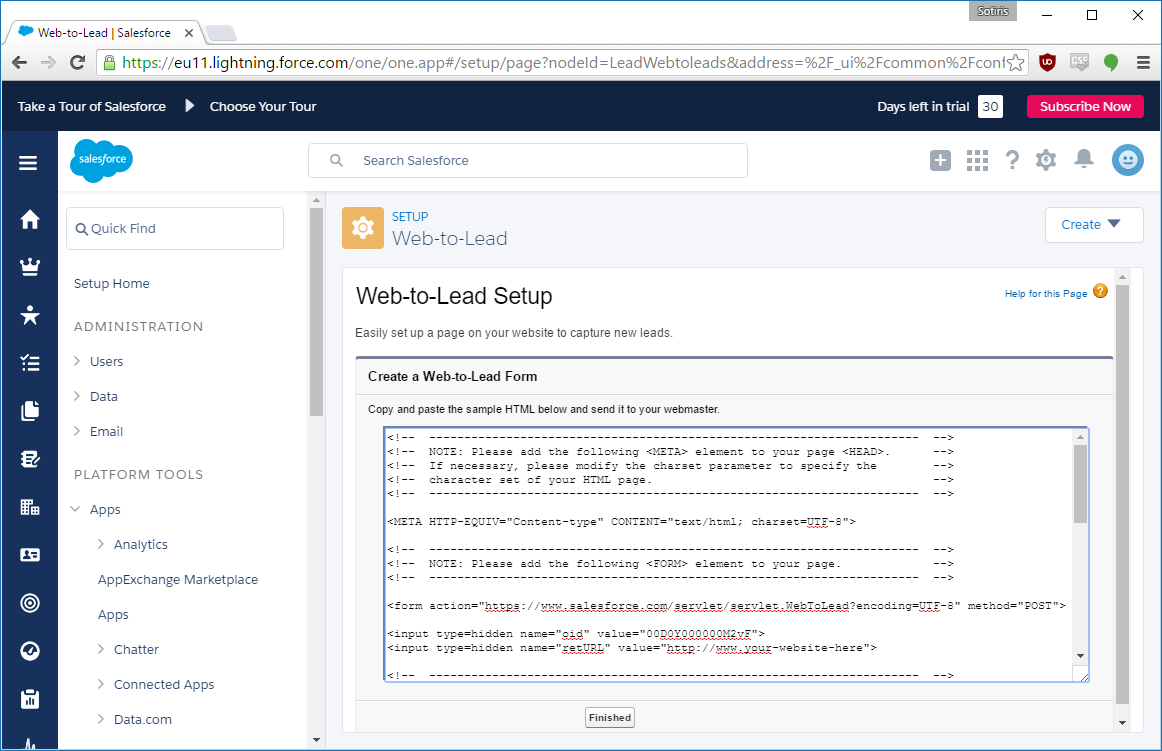
Once you are finished with SalesForce's steps you'll end up on a screen like the screenshot above from which you can copy the generated HTML.
Now, let's follow the steps below to create our Engage Box
- Go to Components > Engage Box
- Create new box by clicking on the New button from the top bar
- Write a title in the Title field
- Click on the Toggle editor button at the bottom of your editor
- Paste in the textarea the generated HTML code from beforehand
- Click again on the Toggle editor button at the bottom of your editor
- Save your box now or set some of its other settings first and then save!
Salesforce Integration is available in Pro
Unlock this and dozens of other powerful features by upgrading to EngageBox Pro.
Unlock this feature
Last updated on Jul 7th 2025 09:07

Tassos offers a premium suite of Joomla extensions with 6 products and over 1.7 million downloads, providing reliable solutions since 2014.


 Rated:
Copyright © 2014 - 2025 - Smile Motive Development LP. All Rights Reserved.